
 Original vector illustration for this guide; it is explanatory artwork, not market or performance data.
When someone asks for your website address, they usually mean your domain name: a short, readable name such as example.com. But the domain is not the website, the web server, or the full address in the browser. It is one part of a system that helps people and software find the right online service.
This guide follows a domain from the moment someone types it into a browser to the moment a page appears. It also explains who registers a domain, what DNS records do, and which steps are needed to connect a name to a working site. The examples use reserved names such as lumenbikes.example; they are fictional and are not available to register.
Quick answer: a domain name is a human-readable name in the Domain Name System (DNS). DNS can direct that name to internet services such as a website or email provider. Registering the name does not automatically create a website or buy hosting.
Domain name, URL, website and IP address: what is the difference?
These terms are related, but they describe different things. Keeping them separate makes setup instructions much easier to follow.
| TermExampleWhat it means | ||
| Domain name | lumenbikes.example | A readable name registered under a top-level domain and used in DNS. |
| URL | https://shop.lumenbikes.example/catalog | A complete address that can include a scheme, host, path, query, and fragment. |
| IP address | 192.0.2.25 or an IPv6 address | A network-layer address used to route traffic. A domain may resolve to one or more addresses, or to another DNS name. |
| Website | A set of pages and files | The content and software a web server returns. It may be hosted separately from the registrar where the domain was registered. |
| Web hosting | A hosting account or server | The service or infrastructure that stores, serves, or runs website content. |
For example, in https://shop.lumenbikes.example/catalog?color=blue, https is the scheme, shop.lumenbikes.example is the host, and /catalog is the path. The query starts after ? and carries extra information for the site. The domain name is only part of the host; the URL is the complete address.
An IP address is not the same as a domain. One IP can serve many websites, and a website can be delivered from different IP addresses over time, for example when a provider uses a content delivery network. That is why a domain name is useful: it gives people a stable name while DNS and the service provider manage where requests should go.
How a domain name is organized
DNS names are arranged in a hierarchy. The final label on the right is the top-level domain (TLD), such as .com, .org, or a country-code TLD. Labels to its left identify more specific names. In shop.lumenbikes.example, shop is a subdomain of lumenbikes.example.
The phrase second-level domain is often used for the label directly to the left of a TLD, but registration patterns differ. For instance, a country-code registry may offer names under a structure such as .co.uk. In that case, people commonly treat example.co.uk as the registrable domain. The rules and public-suffix boundaries depend on the extension, so do not assume every domain has exactly two labels.
A subdomain such as shop.example.com is usually configured by the person who controls example.com; it is not normally a separate registration. Subdomains are useful for a store, help center, blog, or application. They can point to different services while sharing the main registered domain.
How DNS finds the right service
The Domain Name System is a distributed naming system. Its records help resolvers find information associated with a name. It is often compared with a phone book, but DNS does more than translate a name into one fixed address: it can return different record types and direct traffic through aliases or service providers.
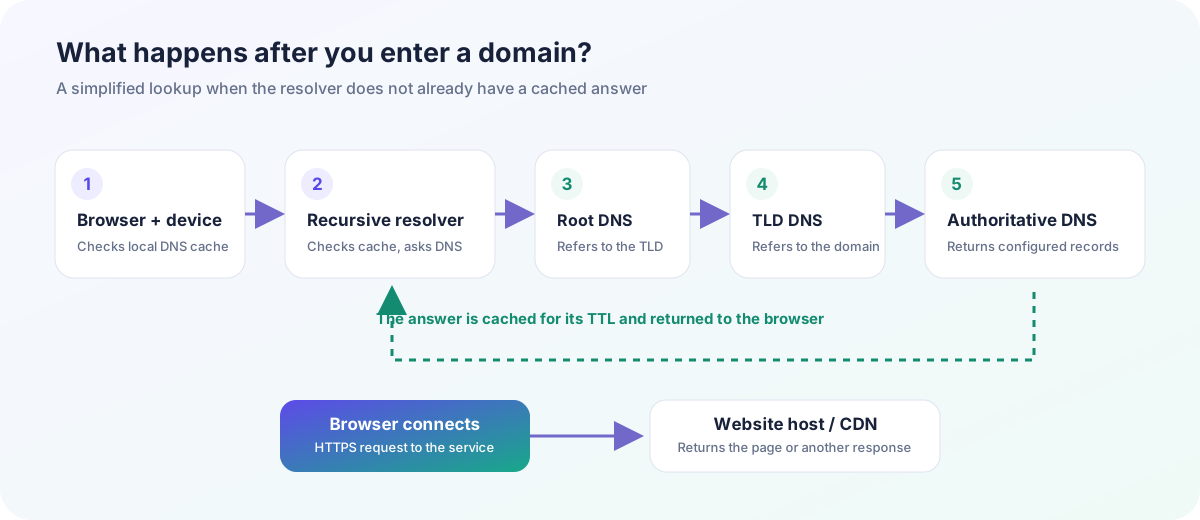 A simplified lookup: caches can answer early; when they cannot, a recursive resolver follows DNS referrals to an authoritative answer.
Here is the usual sequence when a visitor opens a site and the answer is not already cached:
- The browser checks its available information. The browser and operating system may have a recent DNS answer in cache. If they do, the resolver does not need to repeat every lookup.
- A recursive resolver looks for an answer. This is commonly operated by an internet provider, organization, or public DNS service. It checks its own cache first.
- The resolver follows the DNS hierarchy. If it has no cached answer, it can ask a root server where to find information for the relevant TLD, then ask a TLD nameserver which authoritative nameserver serves the domain. These servers provide referrals; the root server is not a directory of every website's IP address.
- An authoritative nameserver returns the configured record. Depending on the setup, the answer may include an A record for IPv4, an AAAA record for IPv6, a CNAME alias, or other information. A website behind a CDN may use provider-specific targets rather than a single permanent server address.
- The browser connects to the service. It uses the returned information to reach the web service, negotiate HTTPS when configured, and request the URL path. The web server then returns a page, a redirect, or an error.
Other DNS records serve other jobs. MX records identify mail-handling servers; TXT records are commonly used for domain verification and email policies; NS records identify authoritative nameservers. A DNS change can affect a website, email, or both, so check which records already exist before replacing a zone.
DNS caching is the reason a change may not appear everywhere at once. Records include a time-to-live (TTL), which tells caches how long an answer may be kept. Updating the authoritative record does not instantly clear every resolver's cache. “Propagation” is a convenient description of this delay, not a single switch that updates every device at the same moment.
Who registers a domain?
Three roles come up when a domain is registered:
- Registrant: the person or organization listed as holding the registration rights under the applicable agreement.
- Registrar: the company or service through which a customer submits a registration or manages a domain. Registrars also provide account, renewal, and transfer controls.
- Registry: the organization that operates a particular TLD's registration system and authoritative registry data.
For many generic TLDs, ICANN accreditation is part of the registrar framework. Country-code TLDs and other extensions can have different registry arrangements, eligibility rules, and dispute policies. Check the relevant registry and registrar documentation for the extension you want; a checkout page is not a substitute for understanding renewal or transfer conditions.
People often say they “own” a domain. In practice, a registration gives the registrant defined rights for a set term, subject to the registration agreement, renewal, registry policy, and applicable law. Keep the account under the control of the person or organization that should manage the domain. Use a unique password and multi-factor authentication where available.
Registration, DNS and hosting are separate steps
Registering a name reserves it through a registrar for the agreed term. It does not include the files or software that make a website, and it does not always include email or hosting. These services can be bought from one provider or several. The important part is knowing which account controls the registration, which nameservers publish DNS, and which provider serves the website.
A simple launch often looks like this:
- Choose a name and check it. Search for the exact spelling with a registrar, review the extension's eligibility and renewal price, and research trademarks and existing businesses. A search result is not legal clearance.
- Register it in the right account. Use an email address the organization controls, turn on account security, confirm renewal settings, and save recovery information.
- Choose where DNS will be managed. The registrar may host DNS, or you may use a separate DNS provider. Set nameservers only when the destination provider is ready with the correct records.
- Connect the web host. Follow the host's current instructions. This may involve setting A/AAAA records, a CNAME, or nameservers. Do not guess values or overwrite email records without checking them.
- Set up HTTPS and test. Configure a TLS certificate through the host or CDN, check both the root domain and any chosen subdomain, and test on a phone and desktop.
- Keep the domain maintained. Monitor renewals, update account contacts, and keep a record of DNS settings. If email matters, test sending and receiving after DNS changes.
Changing DNS records is not the same as transferring a domain. A DNS change tells the domain's authoritative DNS where a service is located. A registrar transfer moves management of the registration from one registrar to another. In many cases the existing nameserver setup can remain in place during a transfer, but procedures vary; check both registrars and save the current DNS zone before starting.
Common beginner mistakes
Assuming a registered domain is already a website
A domain can be registered but have no website records, show a parking page, redirect somewhere else, or be used only for email. A hosting plan and correctly configured DNS are separate requirements.
Changing nameservers without copying email records
Replacing nameservers can replace the active DNS zone. If the new zone does not include the required MX, TXT, and other records, email delivery or verification may fail. Export or copy the existing records first, then test after the change.
Expecting every DNS change to appear immediately
TTL values and caches affect what different resolvers show. Check the authoritative nameserver and at least one independent resolver, but do not keep making additional edits simply because one device still has an older cached answer.
Confusing a search result with a completed registration
Availability can change between a lookup and checkout. Confirm the order has completed in the registrar account and that the registrant details are correct. Treat third-party “available” results as a prompt to verify, not a reservation.
Leaving renewals and access to chance
Keep payment methods current, enable useful reminders, and ensure more than one authorized person can recover the organization’s account where appropriate. Domain recovery after expiration depends on extension rules and timing; do not rely on being able to reclaim it later.
Domain-to-website checklist
- Confirm the exact spelling, extension, registration price, renewal price, and eligibility.
- Check business names and relevant trademarks before using the name publicly.
- Register the domain in an account controlled by the right person or organization.
- Enable multi-factor authentication and set renewal reminders.
- Record the current nameservers and export DNS records before editing them.
- Connect the host using the provider's current DNS instructions.
- Test website, HTTPS, email, and important subdomains after changes.
- Keep access, billing, and renewal information up to date.
For a domain name idea, the DomainFits generator can combine a root keyword with word-list suggestions. It does not query a registrar or check availability. For name selection, see ten practical tests before choosing a domain; for extension trade-offs, read our guide to domain extensions.
Frequently asked questions
Can I have a domain name without a website?
Yes. A registered domain can have no website attached. You can hold it, use it for email, point it to another service, or configure it later, subject to its renewal and registration terms.
Does buying a domain include hosting?
Not necessarily. Some companies sell both, but registration and hosting are separate services. Check the order details and renewal costs for each product.
Can one domain point to more than one website?
A domain can use subdomains for different services, and a DNS provider can direct requests according to configured records. How that works depends on the provider and website architecture.
Does a domain name point directly to one permanent IP address?
No. DNS answers can change, a name can have multiple records, and a provider may use aliases or a CDN. A domain is a name in a system, not a promise of one fixed server address.
What happens if I change DNS?
The new authoritative answer becomes available as configured, while caches may continue using older answers until their TTLs expire. The impact depends on which records you change and whether the new zone includes all required services.
Is a domain name the same thing as a brand or trademark?
No. Registering a domain does not create trademark rights or prove that a name is safe to use. Research relevant marks and get legal advice where the decision has material business risk.
Further reading
For the formal DNS model and record behavior, see the foundational RFC 1034 and RFC 1035. The IANA Root Zone Database lists delegated top-level domains. These references describe technical standards and delegation data; they do not replace a registrar's current terms or extension-specific policies.
Next step: decide what you want the name to communicate, make a small shortlist, then check registration and legal details with the relevant providers before you commit.